Ready-made collections of test questions and quizzes are often available through textbook publishers, and many of these can be imported directly into a D2L course. Some "course cartridges" also include materials like chapter PowerPoints and other supplementary materials. Depending on the publisher, the exact procedure for importing a cartridge or test bank can vary, D2L … Continue reading Course Cartridges and Test Banks
News – Students Are Seeing Old Deleted News Items
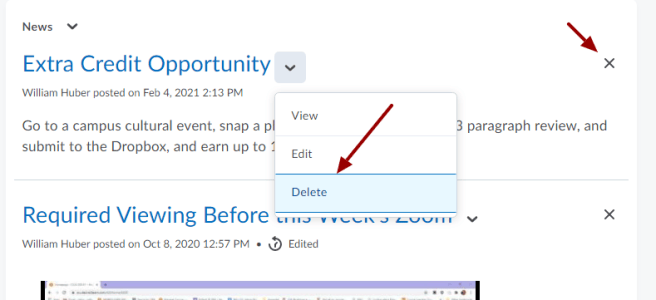
If you've copied over a course from an old-semester, part of the prep in updating your D2L site is removing all of the old News postings from the course home page. If you believe that you've done this, but students are reporting seeing old news items, then you've likely confused the dismiss button with the … Continue reading News – Students Are Seeing Old Deleted News Items
Anonymous Marking in the Dropbox
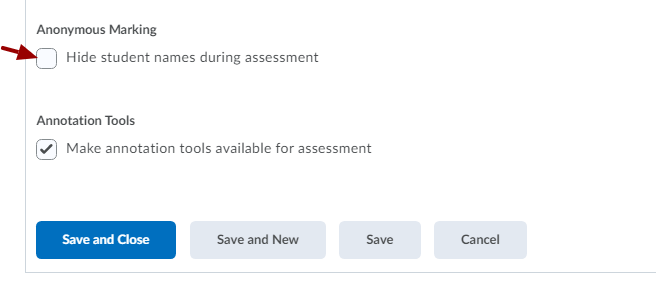
Some faculty have noticed a number of oddities surrounding the (relatively) new "Anonymous Marking" option when creating Dropbox folders for collecting written student work: You can find the Anonymous Marking option near the very bottom of the Dropbox creation screen. Ideally, this can help faculty assess student writing in a more objective way. There are … Continue reading Anonymous Marking in the Dropbox
Bonus Points Aren’t Being Added!
Faculty reporting that bonus points in their D2L gradebook aren't being added to final score most often have their bonus grade items placed inside a category. Go to Grades, then Manage Grades, and see if this is the case: If your grade items are listed indented beneath a category, like above, click on the title … Continue reading Bonus Points Aren’t Being Added!
Students Can’t See or Post to My Discussion!
Most faculty who report that students can't see or post to their discussions in D2L have something that looks like this: These prompts were made by using the New -> Forum option. What's wrong with this? In D2L, a forum is just a box or container meant for holding discussion prompts. Your actual discussion prompts, … Continue reading Students Can’t See or Post to My Discussion!
Gradebook Item – Can’t be Attached to a Dropbox
In this example, we can see that the gradebook item Unit 1 Mini Essay exists in the gradebook, has no associations, and is numeric. Therefore, it should be available to attach to a Dropbox, Discussion, or Quiz activity: However, if I make a Dropbox folder and attempt to attach it, it doesn't show up as … Continue reading Gradebook Item – Can’t be Attached to a Dropbox
User Roles in the Classlist
In the Classlist in your D2L courses, you may notice that you can check the box next to a student's name, then click the Enrollment button to change a student to a different role. These roles grant different types of permissions in how the user may interact with your course. Here's an explanation: Auditing Student: … Continue reading User Roles in the Classlist
Students Collaborating on Quizzes – How to Tell & IP Addresses
A common concern surrounding tests and quizzes on D2L is the possibility of students working together to complete an assignment. Some faculty have found that you can go to the Quizzes tool in a course, click the menu to the right of a quiz, open Grade, then click Attempt 1 beneath a student's entry. The Quizzes Event Log … Continue reading Students Collaborating on Quizzes – How to Tell & IP Addresses
Making a Course Inactive (Hiding a Course)
D2L allows faculty to set their courses to be inactive, so that the course is hidden from all student access. This means that it will not show on the students' My Courses box on their D2L homes screen. If you set a course to inactive, please first email your students letting them know that the … Continue reading Making a Course Inactive (Hiding a Course)
Dropbox – Bulk Download Student Work
Faculty travelling to areas with limited internet access, or those who wish to review student work during rare occurrences of scheduled D2L downtime, may wish to download student papers out of the Dropbox for reading and review on-the-go. Additionally, you can use the following technique to mark up student papers using Office's review tools and … Continue reading Dropbox – Bulk Download Student Work